I
Introduction
Aquino and Co. Law Firm is a general practice law firm in City of Santiago, Isabela — a mid-sized city in the Cagayan Valley region of Northern Luzon, Philippines. The Firm is providing legal services in civil, criminal, family, property, labor, and corporate law. Despite its strong local reputation, the firm relied entirely through walk-in visits and referrals from existing clients. There was no website, no online form, no way for a potential client to find the firm, verify its credibility, or make an inquiry outside of office hours.
This project was initiated to build a complete digital foundation for the firm — not just a brochure website, but a functional client acquisition system that captures every inquiry, automates the intake process, educates potential clients through free legal guides, and gives the firm full pipeline visibility in one organized Google Sheet — all with zero ongoing software costs.
II
Challenges
Before the system was built, the firm faced several operational and digital barriers that were costing them potential clients every day.
01
No Online Presence — Zero Discoverability
The firm had no website, no Google Business listing, and no indexed online content. Potential clients searching for lawyers in Santiago, Isabela could not find them. First-time clients had no way to verify the firm's credibility before making a call.
02
Scattered, Manual Inquiry Handling
Inquiries arrived through Facebook Messenger, personal phone numbers, and walk-ins — with no consistent process. Different staff members handled inquiries differently, and there was no single place to see all incoming leads.
03
No Lead Tracking or Client Pipeline
There was no database of inquiries. Potential clients who reached out but did not book immediately were never followed up. The firm had no visibility into how many leads were coming in, or where they came from.
04
No Self-Service Legal Information for Potential Clients
Clients often arrived at the first consultation without understanding basic legal concepts relevant to their situation. This lengthened consultations and created friction. There was no way to pre-educate clients before they booked.
05
No Transparent Legal Fees Information
Without publicly available fee information, many potential clients self-eliminated before making contact — assuming legal services were out of their budget. This was a silent barrier to new client acquisition.
06
No Digital Payment Receipt System
GCash payments were the firm's primary digital payment method, but receipts were tracked manually — screenshots sent to a staff phone, no organized record, no verification process, and no paper trail for the secretary.
III
Solution Implementation
Instead of relying on manual data entry, a centralized digital intake ecosystem was built using the Google Workspace stack to automatically capture, log, and confirm consultation requests.
Visual Studio Code
➔
Apps Script (HTML, CSS )
➔
Real-Time Sheets Logging
➔
Automated Gmail Notifications & Client Confirmations
➔
Visual Studio Code
➔
Custom Apps Script Form
➔
Real-Time Sheets Logging
➔
Automated Gmail Notifications & Client Confirmations
➔
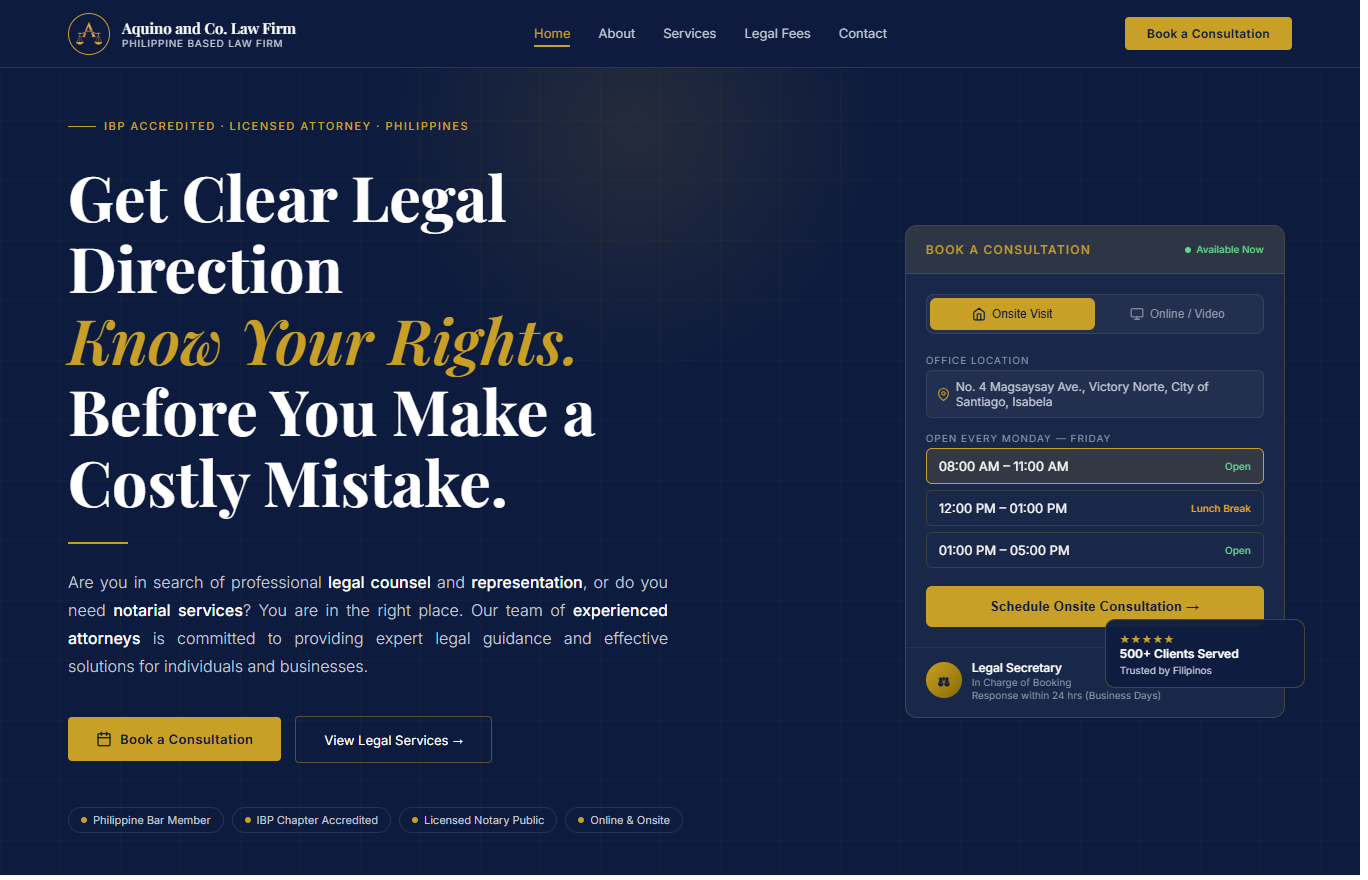
Professional Law Firm Website: I designed and vibecoded a professional, fully responsive law firm website optimized for both desktop and mobile view responsiveness, establishing the firm's online presence, improving search visibility, and providing prospective clients with a credible platform to learn about its legal services before making contact.
Centralized Legal Intake System: I strategized, built, and deployed a customized online legal intake system using Google Apps Script, creating a standardized channel for client inquiries while automatically capturing and organizing all submissions.
Real-Time Client Inquiry Database: I vibecoded every inquiry submission directly to Google Sheets, creating a centralized database that automatically logs, tracks, and organizes prospective clients for efficient follow-up and case management.
Legal Information Resource Center: I created dedicated service pages with legal information, consultation guidelines, and frequently asked questions to educate prospective clients before their initial consultation.
Transparent Legal Fee Guide: I researched and published consultation fees and legal service pricing on the website, helping prospective clients understand expected costs and reducing uncertainty before making an inquiry.
Digital Payment Verification System: I developed an online payment receipt submission system that securely collects GCash payment details and automatically records each transaction in a centralized database for verification and record-keeping.
Visual Studio Code
Google Apps Script
Google Sheets
Google Drive
Netlify Hosting
IV
Results
5
Pages Delivered
Homepage, Booking, Legal Fees, Legal Guides, Privacy & Terms
3
Automated Pipelines
Booking intake + Lead capture + Payment processing, all feeding Google Sheets live
15
Practice Areas
Fully showcased with stacking card animation and verbatim descriptions
5
Free Legal Guides
Civil, criminal, property, labor, corporate — plain language for clients
₱0
Monthly Software Cost
Zero recurring fees — Netlify free tier, Google tools, no SaaS subscriptions
24/7
Lead Capture Active
System captures inquiries, alerts the firm, and organizes data around the clock
01. Accelerated Client Intake Client inquiries are now captured instantly through a centralized online intake system, eliminating manual inquiry handling and reducing administrative response time.
02. Centralized Client Management All consultation requests, legal guide downloads, and payment submissions are automatically organized in a single Google Sheets database, giving the firm complete visibility into its client pipeline.
03. Enhanced Client Experience Prospective clients can discover the firm online, access legal information, book consultations, and receive instant email confirmations through a seamless digital experience available 24/7.
04. Streamlined Administrative Workflow Workflow automation replaced manual booking, payment verification, and email communication processes, allowing legal staff to spend less time on administrative tasks and more time serving clients.